POWER BI CONNECTOR FOR SALESFORCE
Salesforce data in Power BI, without the pipelines
A controlled, production-grade Salesforce Power BI connector — no-code, no row limits, built for large datasets, complex schemas, and analytics that must work every day
Two ways to try it — choose your trial on AppExchange →
In production
at enterprises like



/ 01 · APPROACH
A safer alternative to custom pipelines
Replaces fragile scripts, manual exports, and in-house ETL with a supported connector — one integration to run, one vendor accountable for it, instead of custom code only its author understands.
/ 02 · ARCHITECTURE
Runs natively in your Salesforce org
Installed and managed entirely inside Salesforce — no external infrastructure to run, no third-party servers in the data path, no separate system to secure, patch, and monitor.
/ 03 · STABILITY
Predictable behavior over time
Remains stable as Salesforce implementations grow and change. Salesforce data stays available in Power BI without constant rework, firefighting, or maintenance windows.
/ 04 · ECONOMICS
Lower cost of ownership
Avoids the ongoing engineering cost and complexity of custom Power BI Salesforce integrations. A supported, no-code connector replaces scripts, pipelines, and the people-hours required to keep them running.
/ 05 · GOVERNANCE
Governed at the point of access
Respects Salesforce permissions, sharing rules, and field-level security — so analytical access is auditable and consistent with the source system, without proliferation of replicated datasets.
/ 06 · OPERATING MODEL
Owned by the analytics team
No-code configuration means the BI team can own the connection end-to-end — from object selection and refresh cadence to model publishing — without dependency on data engineering for routine changes.
/01
No row limits, no ETL, no infrastructure
Power BI Connector for Salesforce exports data without row caps — unlike the built-in Salesforce Reports connector in Power BI, which limits report exports to 2,000 rows. No middleware to host, no pipelines to schedule, nothing outside your org to maintain.
/02
Export every Salesforce object — and every report
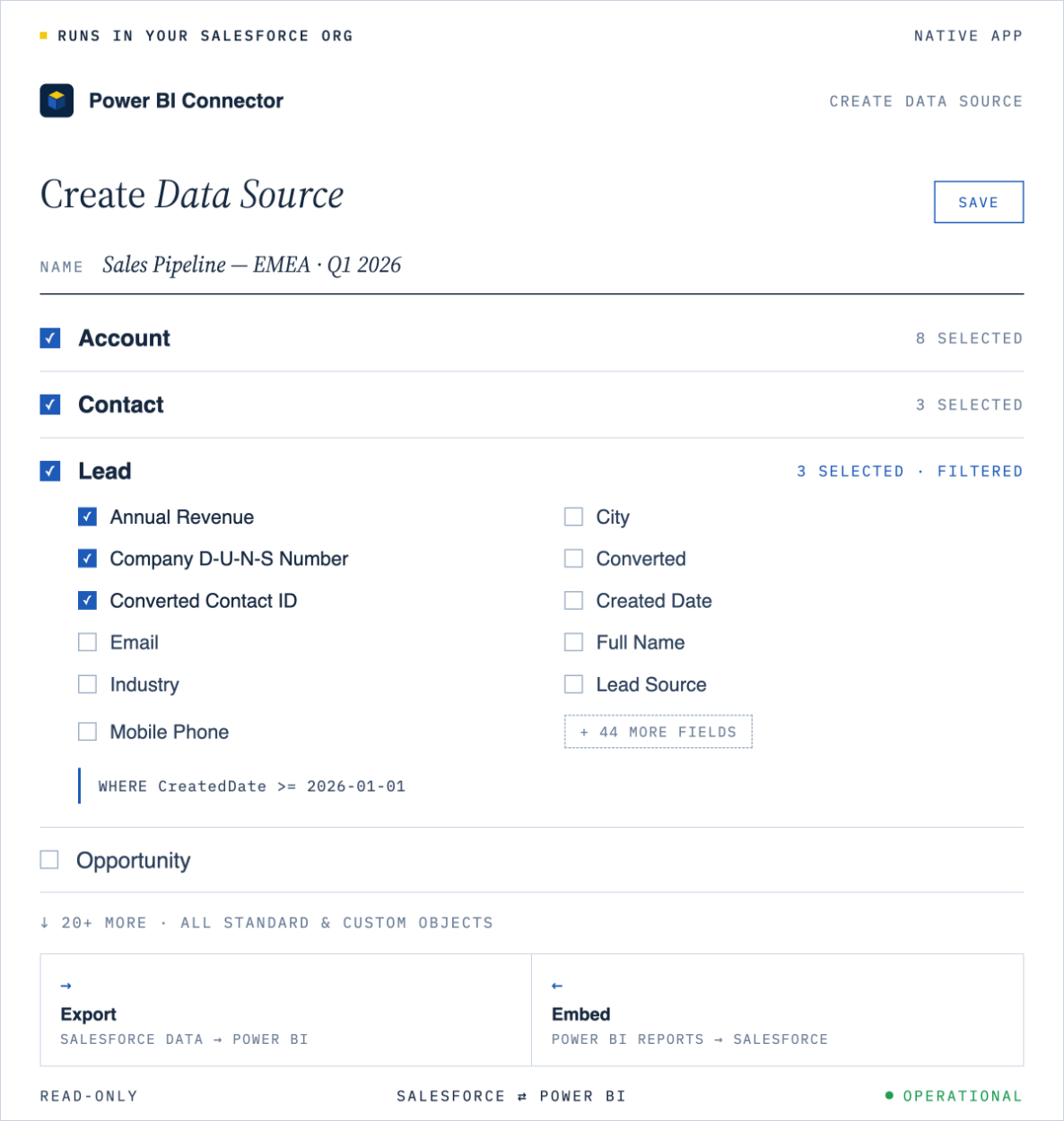
The connector exports standard and custom objects, custom apps, installed packages, and historical trending data into Power BI — plus existing Salesforce reports and joined reports, preserving their logic without rebuilding queries.
/03
Filter Salesforce data at the source, not in Power BI
Scope data before it ever leaves Salesforce — visual filters by date, owner, status, or any field, or SOQL mode for advanced logic. Smaller volumes, faster refresh, cleaner models.
/04
Incremental refresh, fully supported
Set up incremental refresh in Power BI, and each cycle pulls only new or updated Salesforce records instead of reloading the full dataset. That’s what makes frequent, near real-time refresh practical on large Salesforce orgs — without the load time and API cost of pulling everything every time.
/05
Secure access, controlled in Salesforce
The connector authenticates every Power BI connection with personal access tokens, generated and managed in Salesforce. Access is individual and revocable at any time — no shared service accounts, no credentials passed around the team, nothing your security review will flag.
/06
A full audit trail of every change
The connector logs every data source edit, export run, and token action — who did what, and when. Filter by owner or date to answer questions fast, whether it’s a compliance review or investigating an issue.
/07
Built-in interactive ERD of your org
The connector includes an interactive Entity Relationship Diagram — see objects, fields, and how they relate before you build a data source. Export the diagram as PNG, SVG, or PDF, and your org’s structure becomes shareable documentation for the whole team.
/08
Embed Power BI reports inside Salesforce
The connector works in reverse, too: embed any Power BI report you have access to into Salesforce and arrange them into dashboards — even reports built on other systems’ data. Access stays governed by Power BI, and your team gets its BI where it already works, with no extra logins.
/ AUDIENCE 01
Enterprise Revenue Organizations
Sales, Customer Success, and Finance teams operating at scale — complex pipelines, multi-region territories, and forecasting requirements that outgrow spreadsheet-driven reporting.
/ AUDIENCE 02
RevOps & Analytics Teams
Teams accountable for dashboards, reporting SLAs, and operational metrics — where refresh reliability, data freshness, and model stability directly affect the business.
/ AUDIENCE 03
BI, Data Platform & Engineering
Central data and platform teams building governed access layers, semantic models, and a consolidated analytics foundation across Salesforce and other business systems.
/ AUDIENCE 04
Complex Salesforce Deployments
Multi-org and multi-instance environments with custom objects, external integrations, frequent schema change, and strict security requirements that rule out DIY approaches.
/ CASE 01
Global sales organization with a complex Salesforce implementation.
Context. A multinational sales organization running Salesforce across multiple regions — extensive custom objects, regional schemas, and high daily data volume feeding executive and regional Power BI reporting.
Challenge. Custom ETL pipelines required frequent fixes as Salesforce schemas changed. Full reloads caused long refresh cycles and reporting delays. Analytics reliability depended on a small number of engineers.
Outcome with MetricaSalesforce data became consistently available in Power BI via incremental refresh. Schema changes no longer caused frequent report failures, and analytics shifted from firefight to a standard production capability.
/ CASE 02
Enterprise revenue operations team scaling Power BI adoption.
Context. A large B2B organization with Salesforce as the core revenue system. Power BI adoption expanded from a small analytics team to hundreds of business users across sales, finance, and operations.
Challenge. Manual exports and scheduled jobs couldn’t support growing data volumes or increasing refresh frequency. Reporting discrepancies appeared between teams running against different extracts.
Outcome with MetricaPower BI models were rebuilt on top of the connector, enabling consistent reporting across teams. Refresh behavior became predictable, and analytics ownership shifted from engineering to the BI team.
/ CASE 03
Technology company consolidating Salesforce reporting infrastructure.
Context. A technology company with a highly customized Salesforce environment and multiple internal reporting pipelines all feeding the same Power BI tenant — each built at a different point in time.
Challenge. Each pipeline handled schema change differently, leading to inconsistent data models and duplicated maintenance effort. Reporting stability declined as Salesforce usage grew.
Outcome with MetricaThe connector became the single access layer for Salesforce analytics in Power BI. Pipeline maintenance was reduced, reporting consistency improved, and future Salesforce changes could be absorbed without rework.
“
We stopped building Salesforce pipelines. Our BI team owns the connector end-to-end, and schema changes are no longer a project. Reporting just works — which is exactly what the business asked for three years ago.
R
Head of Revenue Analytics
Global B2B technology company · 400+ Power BI users
/ R01 · TECHNICAL
Documentation
Setup, configuration, authentication, refresh scheduling, and a full reference of supported standard and custom Salesforce objects.
/ R02 · SUPPORT
Enterprise support
Direct access to engineers who build the connector — for operational questions, environment-specific issues, and production escalations.
/ R03 · EDITORIAL
Journal & insights
Long-form articles on Salesforce analytics, Power BI data modeling, and operating BI at enterprise scale — updated weekly by the Metrica team.

Power BI Salesforce Templates: 10 Ready-to-Use Dashboards


Salesforce Pipeline Analytics: Snapshots, Waterfall Charts, and CRM Analytics



HubSpot Data Export Limits: Row Caps, Column Ceilings, and Warehouse Workarounds

Multi-Touch Attribution in HubSpot: Models, MQL-to-SQL Reporting, and Pitfalls


HubSpot Data Model Explained: Objects, Associations, and Extracting Data at Scale

SAP BusinessObjects to Power BI Migration: What Actually Changes

How to Export Salesforce Reports to Power BI Without the 2,000-Row Limit

Power BI Dataflows: Enterprise Data Preparation and Reuse Patterns



How to Build a KPI Dashboard in Power BI: A Step-by-Step Guide
Power BI Audit Logs: What to Monitor, Retain, and Report for Compliance



Connect Salesforce to Power BI: Step-by-Step Integration with Power BI Connector for Salesforce



Power BI Center of Excellence: Structure, Roles, and Governance Model
4 Types of Data Analytics: Descriptive, Diagnostic, Predictive, Prescriptive
Migrating Power BI Premium to Microsoft Fabric: What to Expect

Power BI Storage Modes: Import, DirectQuery, and Composite for Enterprise Models




What Is DAX in Power BI? Functions, Formulas, and Practical Use Cases


Power BI Pro vs Premium (PPU & Fabric) in 2026: Pricing & Features


Salesforce Reporting Guide: Reports, Dashboards, CRM Analytics, and Enterprise BI

Power BI Data Connection: How Power BI Connects to Your Data (2026)

What Is Power BI? A Complete Guide to Microsoft’s BI Platform (2026)