POWER BI CONNECTOR FOR SAP
SAP data in Power BI, without custom integration
A ready-to-deploy, no-code connector for SAP S/4HANA, installed in SAP BTP and built for enterprise-scale data volumes and complex SAP data models, without custom integration projects, separate data pipelines, or ongoing connector maintenance.
Try it for 30 days — request on SAP Store →
In production
at enterprises like



/ 01 · NO CUSTOM BUILD
A supported product, not another project
Replaces bespoke scripts, custom endpoints, and separately operated integration services with a connector built for SAP-to-Power BI reporting. Updates, compatibility, and support sit with Metrica — not on your team’s backlog through every SAP release.
/ 02 · MANAGED START
Deployed with you, run by you
Metrica works alongside your SAP administrators through the initial deployment and stays available beyond it. Once the environment is ready, the BI team operates independently — no extraction code, no standing dependency on the vendor.
/ 03 · DATA CONTROL
Your SAP data stays in your environment
The connector runs in an SAP environment that you own and administer. Your SAP data isn’t stored or processed in systems outside your control, and your administrators manage all connectivity and access.
/ 04 · READ-ONLY ACCESS
SAP remains the source of truth
The connector only reads from SAP — it never writes back, and it never keeps a copy of your records along the way. When Power BI refreshes, the data comes straight from the system of record.
/ 05 · DATA SCOPE
Power BI sees only what you select
Each data source carries only the SAP data selected for its purpose — down to individual fields and rows. Everything outside that scope never leaves SAP, keeping analytical access aligned with what each report is entitled to see.
/ 06 · REUSE
One data source, many reports
One approved data source can serve any number of reports. The next dashboard connects to an existing endpoint where scope, access, and credentials are already settled — nothing gets rebuilt.
/01
Multiple SAP services in one data source
Bring the SAP services a report needs into one data source, and Power BI sees them as separate tables through a single connection — ready to be related in the model. No juggling a separate connection for every service.
/02
Entity and field-level selection
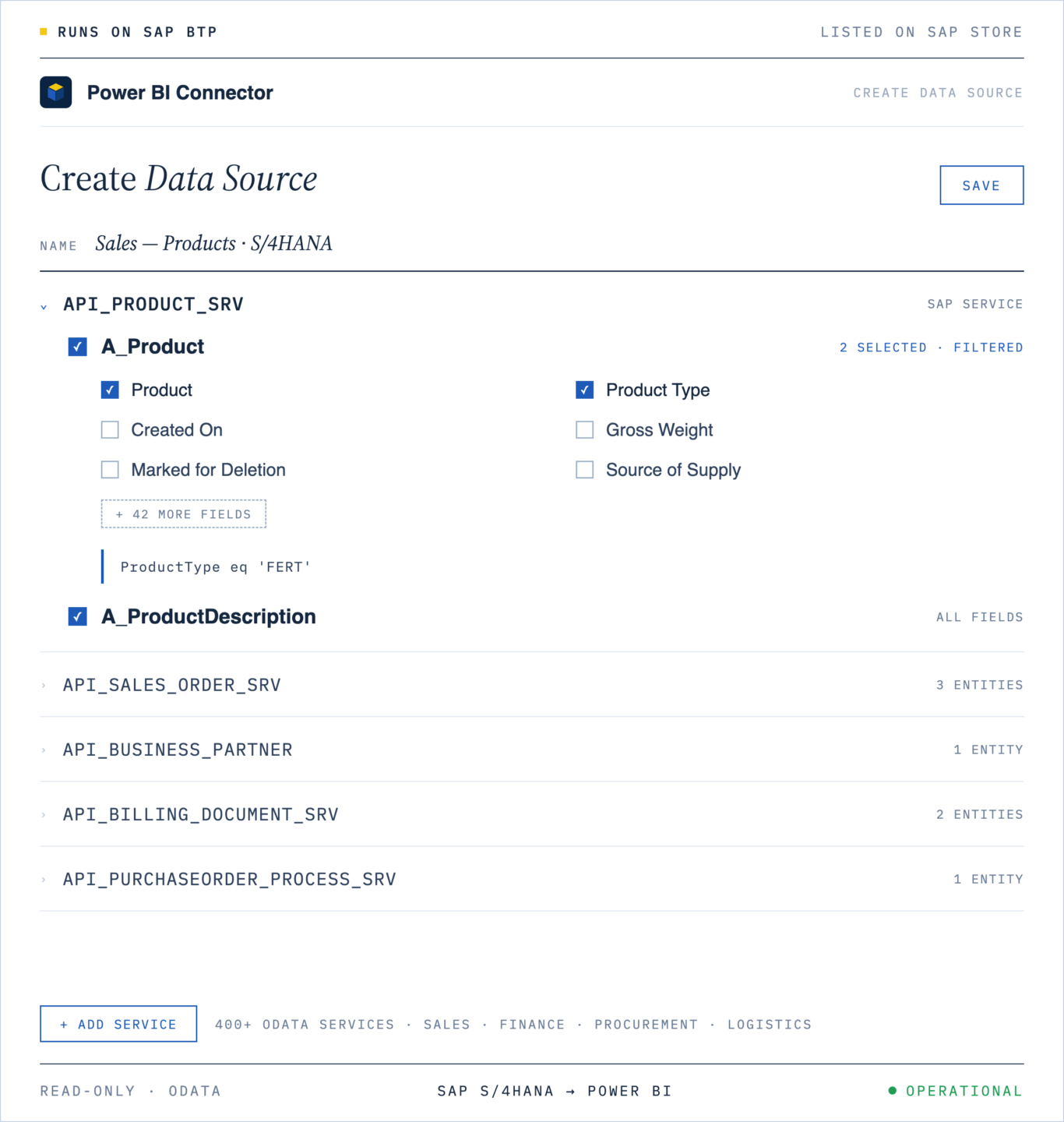
Choose the exact SAP entities and fields a report requires — nothing more travels to Power BI. The selection is visual, so analysts can build a data source without knowing the SAP data model by heart.
/03
Row-level filtering at the source
Decide which records each Power BI report receives before anything leaves SAP. Filters can be built visually or written as expressions, and they run on the SAP side — excluded rows are never transferred.
/04
Data and relationship preview
See your actual SAP data and how the selected entities relate to each other before the data source is saved. Fewer surprises when the model is built in Power BI.
/05
Shared, reusable data sources
Share ready-to-use data sources with selected users so they can work with prepared SAP data in Power BI — without recreating the data source configuration. The data source remains under the owner’s control.
/06
Token-based Power BI connections
Connect Power BI with a personal access token owned by an individual user — including recipients of shared data sources, who connect with their own. Access is individual, traceable, and revocable at any time.
/07
Scheduled refresh in the Power BI service
Set the refresh schedule in the Power BI service — data comes from SAP on every run. No manual reloads, no separate scheduling infrastructure.
/08
Incremental refresh for large datasets
Refresh large SAP datasets by processing recent records instead of re-importing everything. It is standard Power BI incremental refresh — no custom workaround required.
/ AUDIENCE 01
BI and Analytics Leaders
Teams responsible for scaling SAP reporting in Power BI across the organization, without depending on a new custom integration project for every initiative.
/ AUDIENCE 02
Power BI Teams
Report developers and analysts who need reusable access to approved SAP data without configuring a separate SAP connection or extraction process for every report.
/ AUDIENCE 03
SAP and BTP Teams
Administrators who need to maintain control over SAP connectivity, activated services, technical access, and user permissions while enabling broader analytics use.
/ AUDIENCE 04
Finance and Operations Teams
Business teams that rely on SAP-sourced numbers being current in their everyday Power BI reports, without a manually rebuilt extract going stale between refreshes.
/01
S/4HANA On-Premise
Connected through SAP Cloud Connector. All SAP-side configuration stays with your administrators.
/02
S/4HANA Private Cloud (RISE with SAP)
Connected through SAP Cloud Connector. Configuration is completed in your SAP system.
/03
S/4HANA Public Cloud
Connected through SAP Communication Arrangements, the standard Public Cloud integration model. SAP Cloud Connector is not required.
/04
ECC, SAP BW, and custom configurations
Evaluated individually — compatibility depends on the OData services your system publishes. Contact Metrica for an environment review.
Step 01
Deploy the connector in SAP BTP
An administrator handles the subscription, with Metrica guiding the initial setup. No infrastructure project to plan around it.
Step 02
Configure SAP connectivity and access
Your SAP and BTP administrators connect the backend and decide what it’s allowed to read. Nothing is exposed until they say so.
Step 03
Create a Power BI data source
Pick exactly the SAP data Power BI report needs — services, entities, fields, filters. Saving it creates a data source with its own OData URL, ready to reuse or share.
Step 04
Load SAP data to Power BI
Copy the data source’s URL into Power BI Desktop via Get data → OData feed, and authenticate with your personal access token. The SAP entities show up as tables — ready to build your report on.
/ CASE 01
Enterprise finance organization standardizing SAP reporting.
Context. A large enterprise using SAP as the primary system for financial and operational data, with Power BI adopted for executive reporting across finance, controlling, and business lines.
Challenge. Extract-based pipelines were slow, expensive to maintain, and sensitive to SAP structure changes — every release cycle introduced breakage somewhere in the reporting chain.
Outcome with MetricaSAP data became consistently available in Power BI with predictable refresh behavior, allowing reporting to operate as a stable production capability rather than a recurring fire drill.
/ CASE 02
Manufacturing company with large SAP datasets.
Context. A global manufacturing company running SAP with high data volumes and complex reporting requirements across plants, regions, and product lines — all feeding a shared Power BI environment.
Challenge. Full data reloads caused long refresh times and unreliable dashboards. Operational users lost trust in reports that were intermittently out of date or failed silently overnight.
Outcome with MetricaIncremental access enabled scalable Power BI reporting without ongoing pipeline rework. Refresh windows collapsed, dashboards became dependable, and operational confidence in the numbers returned.
/ CASE 03
Technology company consolidating SAP analytics.
Context. Multiple internal teams maintained their own SAP data integrations feeding Power BI — each built independently, each with its own assumptions and refresh logic.
Challenge. Duplicated engineering effort, inconsistent data models across teams, and growing maintenance cost as SAP usage expanded — with reconciliation becoming a recurring meeting topic.
Outcome with MetricaThe connector became the standardized access layer for SAP analytics in Power BI. Operational overhead dropped, reporting consistency improved, and future SAP changes could be absorbed centrally.
“
We stopped rebuilding SAP extracts after every release. Metrica Power BI Connector absorbs SAP change at the access layer, and our Power BI models no longer drift. SAP reporting went from a standing risk to a non-event.
S
Director, SAP Analytics & Reporting
Global manufacturing group · 500+ Power BI users
/ R01 · TECHNICAL
Documentation
Setup, configuration, authentication, refresh scheduling, and a full reference of supported SAP systems — S/4HANA, BW, SuccessFactors, Ariba.
/ R02 · SUPPORT
Enterprise support
Direct access to engineers who build the connector — for operational questions, environment-specific issues, and production escalations.
/ R03 · EDITORIAL
Journal & insights
Long-form articles on SAP analytics, Power BI data modeling, and operating enterprise BI on SAP — updated weekly by the Metrica team.

Power BI Salesforce Templates: 10 Ready-to-Use Dashboards


Salesforce Pipeline Analytics: Snapshots, Waterfall Charts, and CRM Analytics



HubSpot Data Export Limits: Row Caps, Column Ceilings, and Warehouse Workarounds

Multi-Touch Attribution in HubSpot: Models, MQL-to-SQL Reporting, and Pitfalls


HubSpot Data Model Explained: Objects, Associations, and Extracting Data at Scale

SAP BusinessObjects to Power BI Migration: What Actually Changes

How to Export Salesforce Reports to Power BI Without the 2,000-Row Limit

Power BI Dataflows: Enterprise Data Preparation and Reuse Patterns



How to Build a KPI Dashboard in Power BI: A Step-by-Step Guide

Power BI Audit Logs: What to Monitor, Retain, and Report for Compliance



Connect Salesforce to Power BI: Step-by-Step Integration with Power BI Connector for Salesforce




Power BI Center of Excellence: Structure, Roles, and Governance Model
4 Types of Data Analytics: Descriptive, Diagnostic, Predictive, Prescriptive
Migrating Power BI Premium to Microsoft Fabric: What to Expect

Power BI Storage Modes: Import, DirectQuery, and Composite for Enterprise Models






What Is DAX in Power BI? Functions, Formulas, and Practical Use Cases


Power BI Pro vs Premium (PPU & Fabric) in 2026: Pricing & Features


Salesforce Reporting Guide: Reports, Dashboards, CRM Analytics, and Enterprise BI

Power BI Data Connection: How Power BI Connects to Your Data (2026)

What Is Power BI? A Complete Guide to Microsoft’s BI Platform (2026)