Metrica
Metrica
✕
  • Home
  • Products
    • Power BI Connector for Salesforce
    • Power BI Connector for SAP
  • Resources
    • Blog
    • Trust Center
Explore Products

Home - Metrica Docs - Clone a Data Source

Getting Started

  • Welcome
  • Installation Guide
  • Quickstart — from Zero to a Power BI Report
  • Explore Power BI Connector for HubSpot

User Guide

  • Create a Data Source
  • Connect Power BI Desktop
  • Schedule Refresh in Power BI Service
  • Edit a Data Source
  • Filter Rows
  • Preview Data
  • Preview the Associations Map
  • Clone a Data Source
  • Share a Data Source
  • See What’s Been Shared with You
  • Transfer Data Source Ownership
  • History
  • Explore Associations
  • Browse and Search the Data Sources List
  • Delete a Data Source

Admin Guide

  • Create an Access Token
  • Manage Access Tokens
  • Configure the Token Expiry Policy
  • Application Permissions Setup

FAQ & Troubleshooting

  • Troubleshooting
  • How many data sources can I create?
  • Why is the URL of every data source different?
  • Can I change the data source URL after creation?
  • Can I use the OData URL outside Power BI?
  • Why do I get 401 from the Power BI service after a successful Desktop refresh?
  • Why does the connector limit me to 5 active tokens?
  • What happens if I lose a token?
  • Can a tenant admin see the value of my access tokens?
  • Will the recipient see my access token if I share with them?
  • Can I share a data source with a user from a different tenant?
  • What happens to a shared data source if I leave the company?
  • How is Preview Associations Map different from Data Relationships?
  • Why does the Basic filter editor sometimes disable itself?
  • Why doesn’t the connector cache HubSpot data?
  • Why are my HubSpot datetimes showing in UTC?
  • What happens if I delete or archive a HubSpot property?
  • Why are HubSpot API limits showing up in my refresh errors?
  • What’s the difference between a HubSpot Private App and OAuth connection?

Support

  • Contact Support
  • Pricing and Licensing
  • Subscription Plans and Trial Limits
  • Data Security and Privacy Statement
  • End-User License Agreement
  • Service Level Agreement (SLA)
View Categories
  • Metrica Docs
  • Power BI Connector for HubSpot Documentation
  • User Guide

Clone a Data Source

1 min read

Cloning copies an existing data source — name, description, HubSpot objects, selected fields, and filters — into a new owned-by-you data source. Use it to branch off a working setup for experimentation, or to start from a colleague’s shared configuration.

Clone from the list #
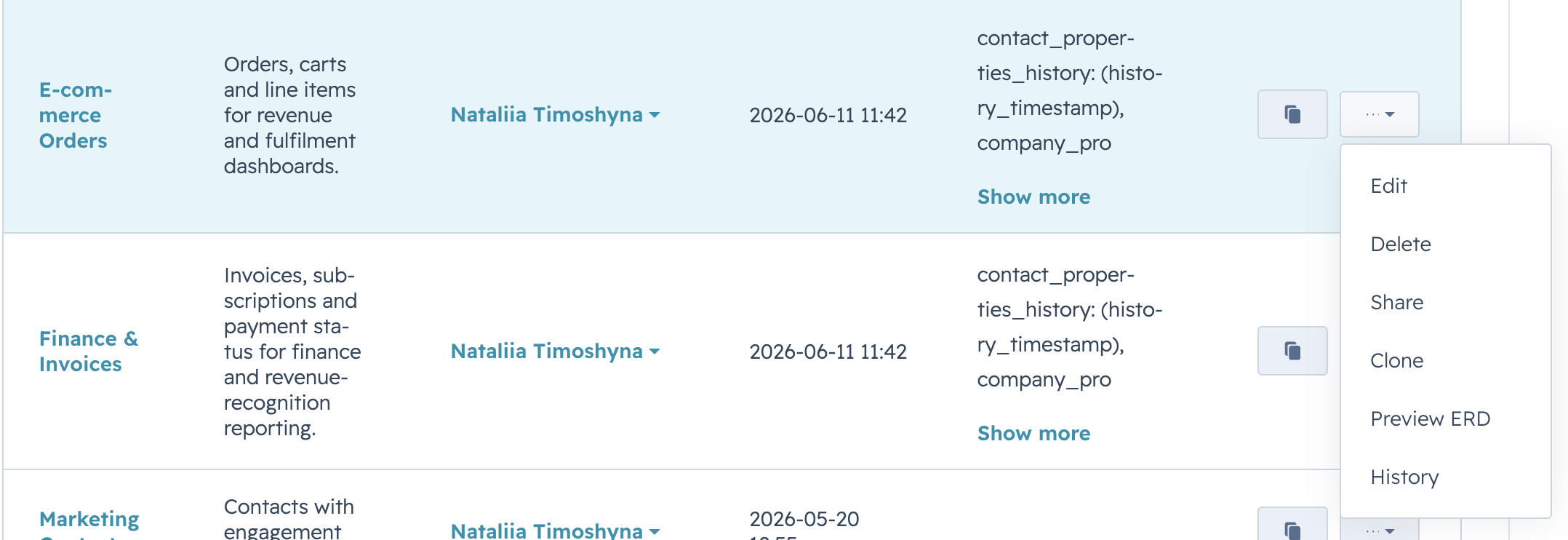
On Data Sources, open the row’s Actions menu and select Clone.

Screenshot pending: clone 01 actions clone

A new row appears at the top of the list, owned by you, with a name derived from the source. The original row is left untouched.

Screenshot pending: clone 02 list after

i

What is and isn’t cloned

  • Cloned: name (with a copy marker), description, HubSpot objects, selected objects and fields, filter expressions.
  • Not cloned: sharing list. The new data source starts with no shared users.
  • Always new: the OData URL. The cloned data source has its own unique endpoint.

Clone a shared data source #

You can also clone a data source that has been shared with you. The clone lands in your own list and is fully editable.

If your subscription has a quota on the number of data sources, cloning counts against it. The clone fails with a quota message if the cap has been reached.

Related #

  • Edit a data source
  • Share a data source
Updated on May 20, 2026

Share This Article :

  • Facebook
  • X
  • LinkedIn
  • Pinterest
Preview the Associations MapShare a Data Source
Table of Contents
  • Clone from the list
  • Clone a shared data source
  • Related
Metrica
Explore Products
Products
  • Power BI Connector for Salesforce
  • Power BI Connector for SAP
Resources
  • Blog
  • Trust Center

Metrica Software builds enterprise data connectors that provide analytics platforms with direct access to complex business systems such as SAP and Salesforce.

The focus is on predictable behavior, controlled access, and long-term operation in production environments.

© 2026. All rights reserved.

Privacy Policy

Terms of Use

    Book a Demo


    Secure & private form

    1-2 min

    ×

      Contact Sales


      Secure & private form

      1-2 min

      ×