Metrica
Metrica
✕
  • Home
  • Products
    • Power BI Connector for Salesforce
    • Power BI Connector for SAP
  • Resources
    • Blog
    • Trust Center
Explore Products

Home - Metrica Docs - Configure the Token Expiry Policy

Getting Started

  • Welcome
  • Installation Guide
  • Quickstart — from Zero to a Power BI Report
  • Explore Power BI Connector for HubSpot

User Guide

  • Create a Data Source
  • Connect Power BI Desktop
  • Schedule Refresh in Power BI Service
  • Edit a Data Source
  • Filter Rows
  • Preview Data
  • Preview the Associations Map
  • Clone a Data Source
  • Share a Data Source
  • See What’s Been Shared with You
  • Transfer Data Source Ownership
  • History
  • Explore Associations
  • Browse and Search the Data Sources List
  • Delete a Data Source

Admin Guide

  • Create an Access Token
  • Manage Access Tokens
  • Configure the Token Expiry Policy
  • Application Permissions Setup

FAQ & Troubleshooting

  • Troubleshooting
  • How many data sources can I create?
  • Why is the URL of every data source different?
  • Can I change the data source URL after creation?
  • Can I use the OData URL outside Power BI?
  • Why do I get 401 from the Power BI service after a successful Desktop refresh?
  • Why does the connector limit me to 5 active tokens?
  • What happens if I lose a token?
  • Can a tenant admin see the value of my access tokens?
  • Will the recipient see my access token if I share with them?
  • Can I share a data source with a user from a different tenant?
  • What happens to a shared data source if I leave the company?
  • How is Preview Associations Map different from Data Relationships?
  • Why does the Basic filter editor sometimes disable itself?
  • Why doesn’t the connector cache HubSpot data?
  • Why are my HubSpot datetimes showing in UTC?
  • What happens if I delete or archive a HubSpot property?
  • Why are HubSpot API limits showing up in my refresh errors?
  • What’s the difference between a HubSpot Private App and OAuth connection?

Support

  • Contact Support
  • Pricing and Licensing
  • Subscription Plans and Trial Limits
  • Data Security and Privacy Statement
  • End-User License Agreement
  • Service Level Agreement (SLA)
View Categories
  • Metrica Docs
  • Power BI Connector for HubSpot Documentation
  • Admin Guide

Configure the Token Expiry Policy

1 min read

The Administration page exposes tenant-wide settings. Today it controls the personal access token expiry policy — whether tokens get an automatic expiry date when they’re minted, and how many days they last.

i

Who can access this page

Only users with the admin role on the connector see the Administration item in the left navigation. Regular users won’t notice the page exists.

The token expiry policy #

Open Administration. The Token Expiry Policy panel has two controls:
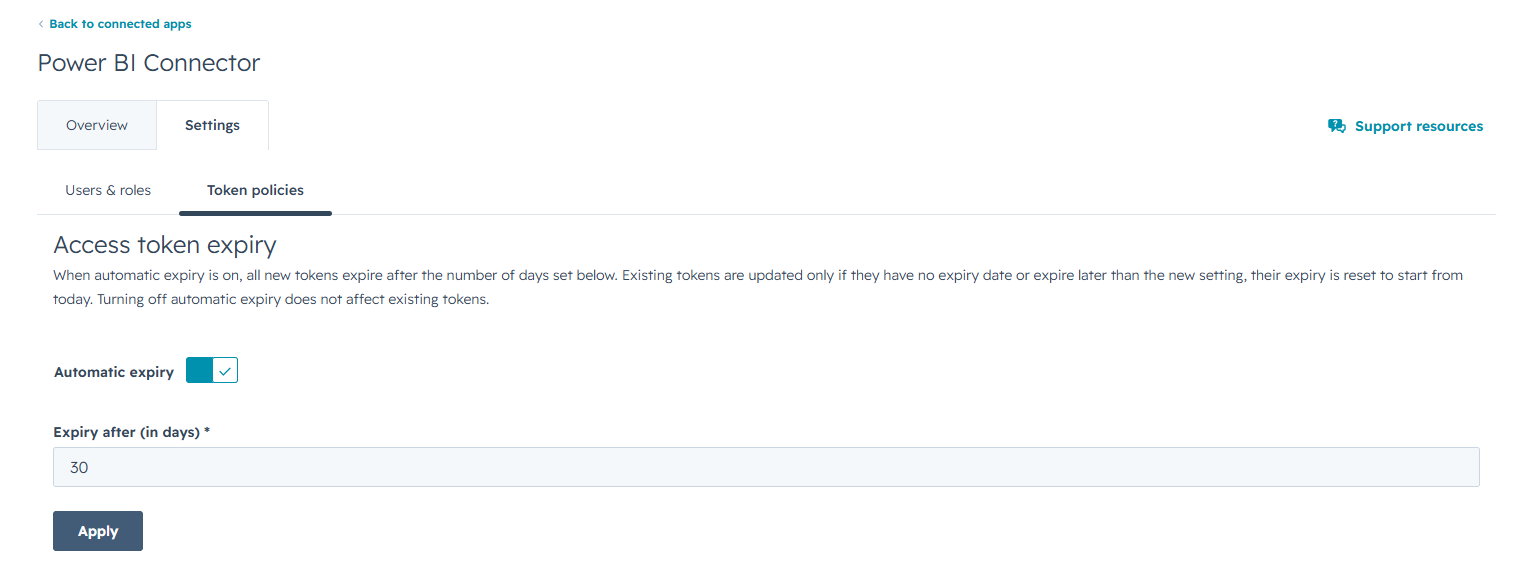
Screenshot pending: admin 01 token policy on

  • Automatic expiry — a switch. When On, every newly minted token gets an expiry date N days from creation. When Off, tokens are No expiry and only stop working when explicitly revoked.
  • Lifetime (days) — the number of days for the automatic expiry. Only shown when the switch is On.

Save changes #

Change either control and the Apply button enables. Select it to commit the new policy.

Existing tokens are not affected. The expiry policy applies only to tokens minted after the change. Existing tokens keep the expiry they were assigned at creation (or stay non-expiring if they were minted under an Off policy).

Choosing a policy #

  • A short lifetime (30-90 days) is safer if tokens might leak — but everyone has to rotate the credentials in Power BI before each expiry.
  • A long lifetime (365+ days) reduces rotation friction but increases the blast radius of a leaked token. Pair it with disciplined use of token labels and prompt revocation when a laptop changes hands.
  • Off (no expiry) is appropriate only for tightly controlled environments where the connector users are a small, audited set.

Related #

  • Manage access tokens
  • View activity history — every token issuance and revocation is logged.
Updated on May 20, 2026

Share This Article :

  • Facebook
  • X
  • LinkedIn
  • Pinterest
Manage Access TokensApplication Permissions Setup
Table of Contents
  • The token expiry policy
  • Save changes
  • Choosing a policy
  • Related
Metrica
Explore Products
Products
  • Power BI Connector for Salesforce
  • Power BI Connector for SAP
Resources
  • Blog
  • Trust Center

Metrica Software builds enterprise data connectors that provide analytics platforms with direct access to complex business systems such as SAP and Salesforce.

The focus is on predictable behavior, controlled access, and long-term operation in production environments.

© 2026. All rights reserved.

Privacy Policy

Terms of Use

    Book a Demo


    Secure & private form

    1-2 min

    ×

      Contact Sales


      Secure & private form

      1-2 min

      ×