A filter limits which rows an object returns to Power BI. Filters are applied at query time on the HubSpot side, so unfiltered rows never travel over the wire. Each object gets its own filter; filters on different objects are independent.
Open the filter editor #
Open the object panel inside the data source form. The Filters section appears between the object header and the property checklist. Use the Hide toggle to collapse the section once you’re done.
Add conditions #
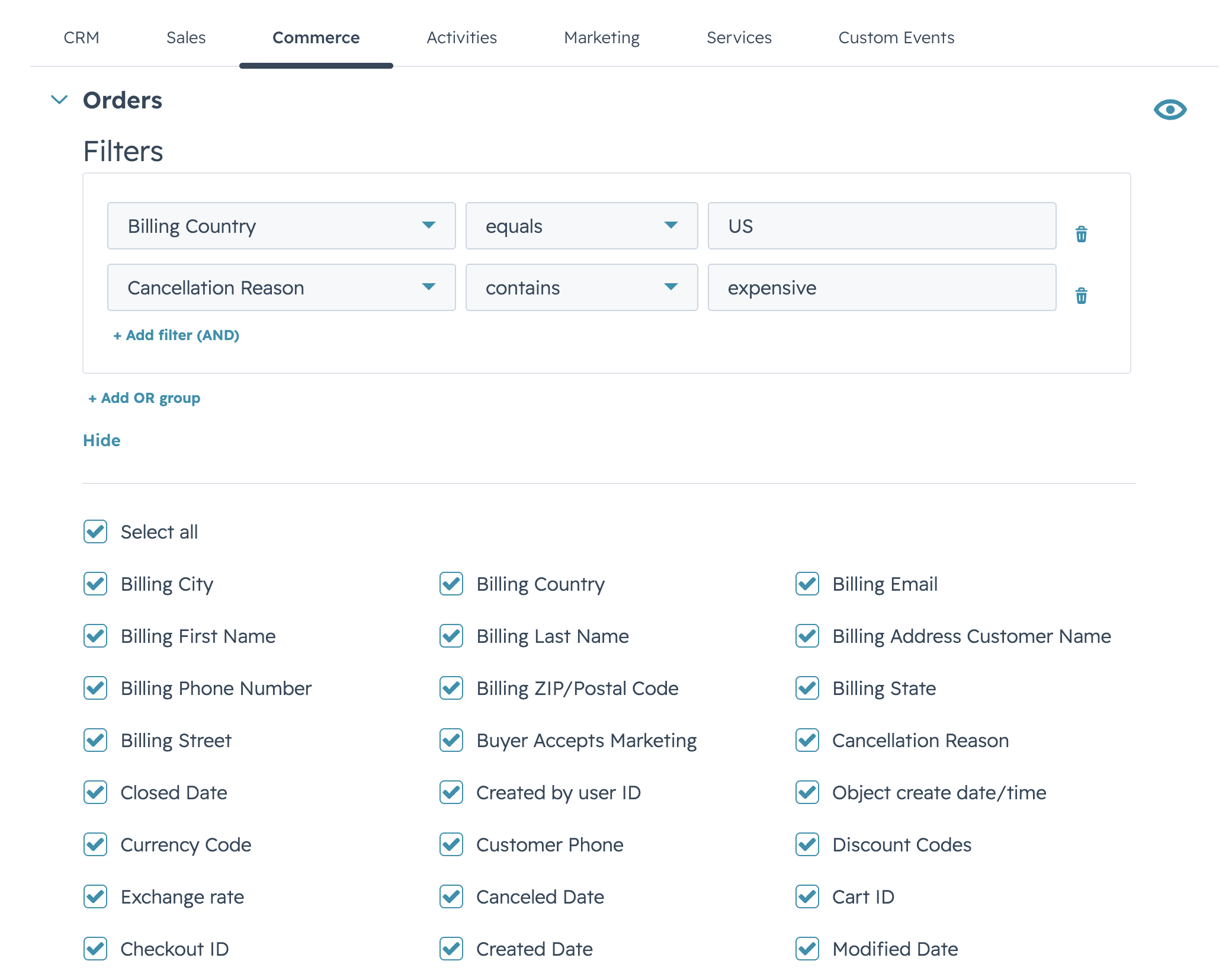
A condition is a row with three pickers: field, operator, and value. Select + Add filter (AND) to add another condition to the current group — conditions inside a group combine with AND.
Select + Add OR group to add a new group whose conditions combine with the previous group’s using OR. The resulting expression has the shape (A AND B) OR (C AND D).
Remove an individual condition with the trash icon at the end of its row. Removing the last condition in a group also removes the group.
Operators #
The operator list adapts to the field type:
- Strings —
equals,contains,starts with,ends with. - Numbers and dates —
equals,not equals, and comparison operators (greater than, less than, and their “or equal” variants). - Booleans —
is true,is false.
Validation #
The editor validates each condition as you fill it in. An incomplete or invalid row (missing value, type mismatch) shows an inline error on the affected row, and Save is blocked while at least one filter on the data source is invalid. Correct the row and the error clears automatically.


